General GuidelinesUpdate Cycle Considerations- ePaper displays are suitable for update cycles ranging from tens of seconds to minutes
- Most black-and-white ePaper screens have a fast refresh rate of 1.5-2.5 seconds
- Ideal for applications where a static image is maintained without constant electricity
Temperature & Color Considerations- Multi-color ePaper displays cannot operate at sub-zero temperatures
- For operation under 0°C, wide temperature (black and white) ePaper is the only suitable option
- If multi-color display isn't essential, we recommend selecting monochrome display
- Operating temperature can be broadened by adding heating film
Safe Handling Guidelines- Do not press the IC area or FPC-to-glass bonding area with your hands
- When handling the display, hold it by the glass part and do not lift by the FPC
- Turn off power before plugging or unplugging the ePaper display
- Always use devices within the rated voltage and current limitations
- Follow ESD-safe handling techniques and maintain 50-60% relative humidity
- Wear gloves or finger cots to prevent contamination
Warning: Never remove flex cables without unlocking holding tabs. Violent removal can damage golden fingers.

The bending direction of FPC

FPC Connection
Handling & Operation PrecautionsAssembly Guidelines- Remove protective film from ePaper display prior to assembly
- Handle displays with care to avoid excessive pressure during assembly
- Implement strict measures to prevent static discharge (keep ESD below ±200V)
- Limit load to less than 1kg to prevent damage to bonds
Operation Conditions- Avoid exposing the ePaper display to direct sunlight
- Adhere strictly to provided specifications when designing driving circuits
- Allow at least 180-second interval after completing a set of display updates
- After every 5 partial updates, perform a full update to prevent ghosting
- Set the display to deep sleep mode for long intervals between updates
- FPC bending position should be 1.0-1.5mm away from glass edge

FPC Bending Position
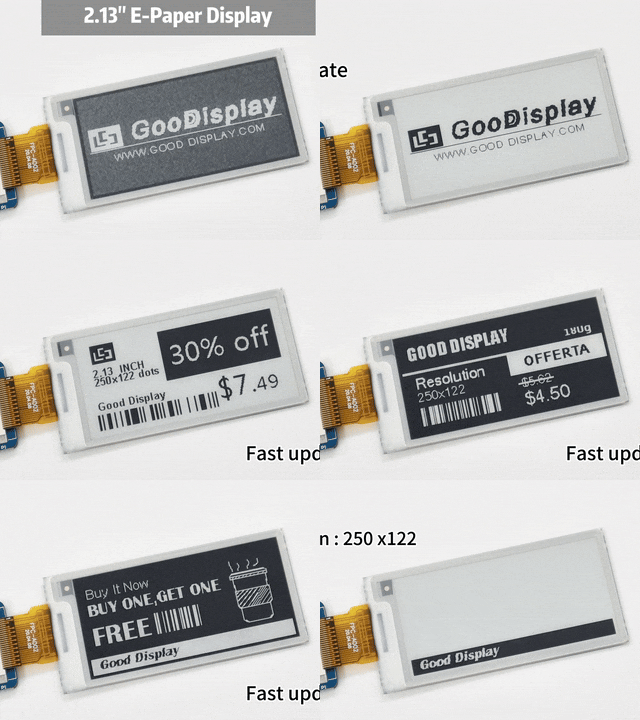
Display Update Process
Best Practice: Perform a full update at least once every 24 hours for multi-color and full color ePaper displays.
Flexible ePaper Display Operation- The IC and surrounding areas are not flexible and should not be bent
- Use gentle methods like suction cups when handling flexible displays
- Both front and back of the display should be free from granular foreign objects
- Operating and storage temperatures should not exceed 70℃
- Current flexible displays are lightweight, space-saving, and less prone to breaking
- Not recommended for use in curved areas as this increases damage risk

1.54inch Four-color Flexible Display
Designing the End-Customer ProductProduct Design Considerations- Use provided 3D files for optimal design when available
- Ensure adequate slack for proper FPC insertion and routing
- Avoid contamination of the "golden finger" area on flex cables
- Design battery low power detection and auto-update to full white
- Never apply pressure to the glass area of the display
- The mid-frame material between the EPD module and system PCBA must be electrically conductive to mitigate EMI risks and other electromagnetic compatibility (EMC) issues
Connector & Cable Management- Use MOLEX original connectors for reliable electrical connections
- Insert FPC cables squarely without causing buckling
- Inspect after insertion to confirm proper assembly
- Apply stiffening tape overlapping connector and flex cable

EMC Prevention

Connector Handling
Touch Screen Guidance- Never attempt to separate touch panel assemblies from displays
- Small air bubbles indicate uneven forces being applied to the product
- Avoid applying chemicals to capacitive touch panel surfaces
- Ensure only the intended stylus is used for the touch panel
- Avoid applying excessive force beyond normal expectations
- Ensure hands are clean during operation to prevent recognition issues

Touch Screen
Storage Guidelines- Optimal Environment: Maintain 23±3°C temperature and 55±10% humidity
- Orientation: Store with front facing up and flat, displaying a white pattern
- Timely Use: Utilize displays as soon as possible after unpacking
- Protection: Keep in original packaging until ready for installation
- Long-term: For storage over 6 months, refresh display every 3 months
Storage Tip: Displaying a white pattern during storage prevents inerasable ghosting and maintains optimal performance.
Ready to Maximize Your Display Performance?]Download our complete guidelines for optimal ePaper display usage Download Full Guidelines (PDF) |


 Posted on 2025-12-26 14:51:38